


 By
By 
Why this guide exists
Looking for the best encrypted email for business can be quite an irritating and confusing task. You must endure a sea of acronyms, a cacophony of jargon, and a lot of "quick" meetings with sales bros just to get real pricing and facts.
How could something as necessary and fundamental to network security as email encryption be so complicated and expensive? I mean, we live in a world where we're basically besieged by hackers and bots, like 24x7x365, so why has no one made this simpler and cheaper?
Well, so that's what we did. We call it SecureMyEmail.
Quick Summary
- Finding the best Email Encryption solution for your business can be lengthy. This comprehensive guide aims to make it easier for you.
- The best encrypted email provider will vary from business to business depending on their size, resources and requirements.
- This guide compares the best email encryption providers in the market and makes an objective comparative analysis.
- Microsoft Purview, Google Workspace, Virtru, and PreVeil are good enterprise email encryption service providers. ProtonMail, Tuta, Zix, and Barracuda are among other encrypted email solutions available for businesses.
- SecureMyEmail offers true end-to-end email encryption with zero knowledge and works great for everyone - doesn't matter if you are an individual, a small or large business.
Are we biased?
A fair question to ask at this point would be, are we, as owners of an encrypted email service ourselves, too biased to provide a fair and honest comparison of business email encryption service providers?
No. We're not. And, here's why.
We totally realize we're not right for everyone. Other email encryption solution providers have their strengths and may be better for your business. It's really about finding the best match.
It's also a big enough market where we don't have to be greedy. We don't want to waste your time, or our own, if we're not right for you.
Try SecureMyEmail without the sales ritual
In fact, we're so interested in not wasting time, we offer a totally free trial where you can just try it out. Like, right now. You don't even have to talk to us or provide any payment information. Just download the software, or one of our mobile apps, and give it a go.
You can be sending end-to-end encrypted email using your current email provider a few minutes from now.
Each trial user sets themselves up individually by downloading our app for Mac, Windows, iOS, or Android. Individuals can just pay in the software by going to Settings → Subscription. And if you're a business with multiple users that wants unified invoicing, some setup assistance, or have any questions whatsoever? Just email sales@securemyemail.com and we’re all over it.
And, we almost forgot the best part: SecureMyEmail is only $2.50/user/month annually, or $3.99 month-to-month.
Want to skip ahead and compare the contenders? Choose your fighter:
Jump to a provider
- Comparison Matrix
- Microsoft Purview
- Google Workspace
- Virtru
- PreVeil
- SecureMyEmail
- ProtonMail for Business
- Tutanota for Business
- Zix and Barracuda
TL;DR
If you're a small or mid-sized business that just wants to send encrypted email without hiring an IT sorcerer, we’ve got some thoughts. If you're a 5,000-seat enterprise with a compliance team and a Salesforce tower, you probably already bought Microsoft and stopped reading.
Comparison Matrix
| Provider | Works w/ Existing Email | End-to-End Encryption | Zero-Knowledge | No Recipient Account or Software Required | Pricing (per user/mo) |
|---|---|---|---|---|---|
| Microsoft Purview | ✅ (M365 only) | ⚠️ (E2EE requires S/MIME + key management) | ❌ | ⚠️ (often portal/OTP) | $36–$57 (plan-dependent) |
| Google Workspace | ✅ (Workspace email) | ⚠️ (CSE is Enterprise-only + external key service) | ❌ | ⚠️ (guest flow common) | $7–$22 (Business), Enterprise: quote |
| Virtru | ✅ | ✅ | ✅ | ⚠️ (portal possible) | ~$24+/user (min 5 users) |
| PreVeil | ✅ | ✅ | ✅ | ❌ (invite/app/web) | ~$30/user (mins apply) |
| ProtonMail for Business | ❌(platform switch) | ✅ | ✅ | ✅* | ~$6.99–$12.99/user (annual billing) |
| Tuta for Business | ⚠️ (custom domain on Tuta) | ✅ | ✅ | ✅* | ~€6–€12/user |
| Zix | ✅ | ⚠️ (S/MIME/portal) | ❌ | ❌(portal) | Quote-based (~$4–$10/user, mins) |
| Barracuda | ✅ | ⚠️ (suite/portal) | ❌ | ❌(portal) | Quote-based (MSRP often starts ~$5/user) |
| SecureMyEmail | ✅ | ✅ | ✅ | ✅† | $2.50/user annual ($3.99 monthly) |
Legend: ✅ = no recipient account or software required (may involve a secure link and a one-time code). ⚠️ = extra steps are common (OTP/guest/portal/extension). ❌ = recipients typically get routed into a portal/app flow.
* Proton and Tuta can do “no account or install necessary,” but for external recipients they typically rely on a shared password the sender must create and communicate. In practice, that means sharing a password out-of-band (text/phone), or using the hint field and hoping the recipient already knows what you meant. (Spoiler: you’ll end up texting it.)
† SecureMyEmail external recipients typically open a secure link and enter an one-time passcode automatically delivered via a second email (usually only once per conversation/thread). Prefer the shared-password approach? We offer that too — you can choose per email. Either way: no accounts, no installs, and no recipient registration.
Pricing note (a.k.a. the part vendors don’t love): We did our best to use public list pricing where available. Some vendors publish clear numbers, some publish “starting at,” and some publish vibes. Add-ons, bundles, minimum user counts, contract terms, and reseller channels can change the real price fast. Use this table as a directional guide, then confirm with the vendor before you sign anything.
Microsoft Purview

Welcome to the land of enterprise compliance. Microsoft Purview is the crown jewel in Microsoft's security and compliance suite — assuming you're already paying for the rest of the Microsoft 365 empire. If you’re the kind of organization with a Chief Compliance Officer and a half-dozen SIEM dashboards, congratulations — Purview is probably already running somewhere in your infrastructure.
That said, if you’re a small or midsize business hoping to casually encrypt a sensitive email now and then… prepare to be overwhelmed. Purview isn’t a standalone encryption product — it’s an umbrella brand covering data governance, DLP, eDiscovery, insider risk management, and yes, email encryption service (sort of).
Here’s the important nuance Microsoft marketing tends to… glide past:
- Microsoft Purview Message Encryption (OME/IRM) is the common “Encrypt” option in Microsoft 365. It does let you send encrypted messages to external recipients on Gmail, Yahoo, Outlook.com, etc. — usually via a secure message experience. Great for compliance. Not true end-to-end encryption for email in the “only sender + recipient hold the keys” sense.
- If you want true end-to-end encryption in Microsoft-land, you’re basically talking S/MIME. That means certificates, deployment, client configuration, key lifecycle management, and the kind of ongoing care-and-feeding that makes small businesses quietly go back to texting PDFs. (Don’t do it.)
So yes, Microsoft can do E2EE — but it’s not the default path, and it’s not what most people mean when they say “we bought Purview.”
The good: Deep integration with the Microsoft ecosystem. Policies, DLP, retention, and audit controls are mature. If you’re already all-in on Exchange Online and Microsoft Defender, it fits.
The bad: For actual end-to-end encryption, you’re in S/MIME certificate land. For everything else, you’re mostly getting “enterprise encryption controls” rather than strict E2EE. Recipient experience can vary. Configuration requires real IT skill. And the pricing ladder is… very Microsoft.
Who it’s for: Enterprises that already live in Microsoft 365 and need compliance tooling, policy enforcement, and auditability — not just “encrypt this email.”
Pricing: Commonly tied to Microsoft 365 enterprise plans (for example, Enterprise E3/E5). Expect ~$36–$57/user/month depending on plan and add-ons.
Google Workspace

Google Workspace is like that friend who means well but keeps over-promising. It powers millions of businesses and its Gmail interface is familiar, fast, and mostly frictionless. But when it comes to real email encryption service, the story depends heavily on your plan, your admins, and how much pain you’re willing to absorb.
Google’s big play is Client‑Side Encryption (CSE). In Google’s own words, it’s designed to keep data private with encryption that Google’s servers can’t decrypt — i.e., “end-to-end” in a practical sense for many compliance teams. But it’s not the same vibe as Signal, because your organization controls the keys, and recipients outside your org may access messages through a guest Google experience rather than “it just opens like normal email.”
What this means in practice:
- CSE is Enterprise-only and typically paired with advanced controls/add-ons.
- It requires an external key service / key access system (often described as KACLS in the ecosystem), plus policy configuration.
- It doesn’t apply to personal @gmail.com accounts.
So yes: Google can do a form of “easy E2EE” for enterprise customers — and they’ve made it easier than classic S/MIME. But it’s still not the default for most Workspace users, and it’s not a one-click upgrade from your personal Gmail.
The good: Your team already knows Gmail. For enterprise customers, CSE can deliver strong privacy and compliance controls without living in S/MIME certificate purgatory.
The bad: Most customers don’t get CSE. Enterprise setup still involves key services, admin policies, and recipient experience tradeoffs (guest access for external recipients). It’s “easy” the way enterprise security is always “easy.”
Who it’s for: Organizations already committed to Google Workspace that need regulated-data controls and are willing to pay for (and configure) CSE.
Pricing:$7–$22/user/month for Business tiers. Enterprise is quote-based, and CSE is Enterprise-only (with added key-management complexity).
Virtru

Virtru is what happens when enterprise security tries to dress like a startup. Built around the Trusted Data Format (TDF), Virtru adds encryption and access controls to Gmail, Outlook, and your cloud files. It integrates directly with your email client via browser extensions or APIs, and it’s one of the few options that supports end-to-end encryption with zero-knowledge architecture — even if your IT department hasn’t memorized every RFC.
You’ll still need to set up policies and install extensions, and depending on the configuration, your recipients may end up viewing emails in a portal. Virtru works best with browser extensions for Chrome or Firefox. Without them, the experience often defaults to a hosted secure reader, which isn’t always seamless — especially for non-technical recipients.
Also worth noting: while Virtru is HIPAA-compliant, there’s often a minimum user requirement, which can rule out many small medical or legal practices looking for simple, affordable protection. It’s undeniably feature-rich — you can revoke sent messages, disable forwarding, and set expiration timers — but that control comes with complexity.
The good: Strong encryption, works with your existing Gmail or Outlook, granular policy control, HIPAA-ready. Nice privacy credentials.
The bad: Setup isn’t instant. Requires extensions for smooth operation. Recipients may still get routed to a secure portal. Pricing and minimums may exclude smaller organizations. The marketing is slick — but it’s still enterprise-first.
Who it’s for: Organizations that want strong encryption and policy control — and have the budget, headcount, and patience to set it all up.
Pricing: Starter is $119/month for 5 users (billed annually) — roughly $24/user/month. But it doesn’t stop there: the Business package starts higher (commonly listed around $219/month for 5 users, billed annually), and the total can climb with support/service add-ons and broader platform features. Translation: great tooling, but pricing tends to scale quickly once you move beyond “small team, basic needs.”
PreVeil

PreVeil is the “we do defense contracting” option — even when you don’t. If your workday includes acronyms like NIST 800-171, DFARS, CMMC, ITAR, and other letters that sound like robots arguing, PreVeil will feel oddly comforting.
PreVeil’s pitch is simple: end-to-end encrypted email and files that fit into Microsoft 365 or Google Workspace workflows, without turning your office into a cryptography lab. It supports using your existing email address and integrates with common clients (Outlook/Gmail/Apple Mail style workflows). It also offers web access (“Web PreVeil”) so users can access email encryption service in a browser when needed.
Where PreVeil shines is compliance-heavy environments. It’s designed for organizations that need strong security controls and auditability — and want a vendor who’s clearly built for regulated industries.
The good: True end-to-end encryption with a zero-knowledge design. Works with existing email addresses. Strong compliance positioning (HIPAA and beyond). You get an admin console, logs, and the kind of controls compliance folks love.
The bad: It’s priced like an enterprise product, and the terms can be… not casual. Smaller orgs may find the contract minimums and per-user price hard to justify if they just need “encrypt email, done.” Recipient experience can be great when everyone is inside the same PreVeil universe, but external recipients may still encounter extra steps (web access/invites) depending on how you deploy it.
Who it’s for: Defense contractors, compliance-driven SMBs, and organizations that want serious encryption + admin control and are okay paying for it.
Pricing: $30/user/month for Business. Contract minimums apply (for example, smaller teams may see longer minimum terms). Specialized compliance bundles (like CMMC-focused packages) can be significantly higher.
SecureMyEmail
SecureMyEmail is for people who want encrypted email, not a new religion. If you just need to send truly encrypted messages for your business (HIPAA, legal, finance, HR, “please don’t forward this,” etc.), you should not have to buy an enterprise compliance universe.
SecureMyEmail is built to do one thing extremely well: end-to-end encryption for email with the address you already use. Gmail, Yahoo, Outlook.com, Microsoft 365, Google Workspace, Zoho, custom domains, and more. If your mailbox supports IMAP (most do), it should work.
And yes, we’re going to repeat this because it’s weirdly rare in this market:
- No sales call required.
- No credit card required for trial.
- You can be sending encrypted email in minutes.
Each user can start a trial on their own by downloading the app for Mac, Windows, iOS, or Android. Individuals can subscribe inside the app (Settings → Subscription). Businesses that want central invoicing, help onboarding a team, or admin coordination can email sales@securemyemail.com, and we’ll merge everyone into a paid business account.
Recipient experience
This is where most “secure email” products accidentally punish your recipients for existing.
With SecureMyEmail, recipients do not need to install software or create an account. In most cases, they open a secure link and enter a one‑time passcode delivered via a second email. After that, the thread behaves normally (read/reply), and replies and attachments stay protected.
End-to-end encryption (with an optional convenience mode)
SecureMyEmail supports true end-to-end email encryption, including attachments and replies.
We also offer a passwordless secure-delivery mode for organizations that want maximum convenience for recipients. In that mode, messages may be briefly decrypted in protected server memory, then re-encrypted for delivery and at rest. It is still strongly protected by encryption throughout, and what any marketing person would still call end-to-end encrypted, but it is not “strict E2EE” in the most purist definition.
Most businesses choose the convenience of this mode as it meets almost any compliance requirements, including HIPAA.
Others prefer the unparalleled security of true end-to-end email encryption where the email and contents are not only sent via an encrypted path, but are fully encrypted with a zero-knowledge password before they even leave the sender's device.
With SecureMyEmail, you don't have to choose. We have both.
HIPAA and compliance
If you need HIPAA support, we provide a Business Associate Agreement (BAA) for paid accounts. There is no minimum number of users requirement with us, so solo-practitioners are welcome. Just email us for the BAA.
The good
- Works with your existing email address and provider
- End-to-end encryption, including attachments and replies
- Zero-Knowledge architecture
- Excellent recipient experience, no portals, no accounts, no nonsense
- Fast setup, no IT department necessary
- Free trial with no credit card, and no sales call required
- Ridiculously low cost
Find out more benefits of selecting SecureMyEmail as your email encryption service.
The bad
- We are not trying to be a full-blown DLP / eDiscovery / compliance suite
- If you want advanced enterprise policy orchestration across a massive org, Microsoft and Google have that world covered
- We do not yet offer deep “native” integration inside Outlook or Apple Mail (it works alongside them)
Who it’s for: Small and midsize businesses that want real email encryption, fast, with minimal friction for employees and recipients.
Pricing:$2.50/user/month billed annually ($29.99/user/year). Trial is fully functional, with no credit card required.
ProtonMail for Business
Proton is the “move to the secure island nation” option. The product is solid, the privacy posture is serious, and the ecosystem (Mail, Drive, VPN, etc.) is appealing.
But the tradeoff is the migration. Proton is primarily an email encryption solution provider. That means your business generally needs to move mailboxes, adjust DNS, and accept that you’re joining the Proton world. If you want “keep my existing inbox, just add encryption,” this is not that.
Pricing: Proton’s business tiers are commonly listed around $6.99–$12.99 per user/month on annual billing (e.g., Mail Essentials ≈ $6.99, Mail Professional ≈ $9.99, Business Suite ≈ $12.99). Pricing varies by tier and terms.
Best for: Teams that are ready to migrate to a dedicated email encryption service provider and want a full privacy suite.
Tutanota for Business
Tuta is like Proton’s minimalist cousin who labels everything and alphabetizes their spices. Strong privacy posture, serious encryption focus, and a very direct “no trackers, no nonsense” vibe.
As with Proton, you are generally adopting Tuta as your email home. You can use custom domains, but it’s still a platform move, not “encrypt the inbox you already have.”
Pricing: Public business plans typically run ~€6–€12/user/month depending on tier (with discounts for annual billing).
Best for: Teams that want an email encryption program and do not mind switching.
Zix and Barracuda (Honorable Mentions)
These two show up in a lot of enterprise and healthcare conversations, often through long-standing vendor relationships.
Zix

Zix is the “it’s been here forever” option. It’s widely known, often bundled into broader security stacks, and tends to be deployed through IT channels. In many cases the recipient experience involves portal-style flows or policy-based encryption triggers.
Pricing (what we could actually find): Zix tends to be quote-based, but resellers and HIPAA-focused roundups commonly show pricing in the ~$4–$10/user/month range with minimum user counts (or annual per-user pricing for smaller teams). Translation: expect to talk to someone, and expect “enterprise math.”
Best for: Organizations already standardized on Zix, or those who want a familiar enterprise vendor and do not mind heavier workflow.
Barracuda

Barracuda is security suite land. Email security, filtering, archiving, incident response, and then encryption as part of the broader package. It can be a good fit when you want one vendor for lots of mail security problems.
Pricing (the public bits): Barracuda’s encryption is positioned as part of its Email Protection bundles. Public list pricing is often presented as “starting around ~$5/user/month (MSRP)”, but real-world pricing typically depends on bundle level, term length, and purchase channel (reseller/MSP/AWS).
Best for: Organizations looking for a broader email security platform, not just encryption.
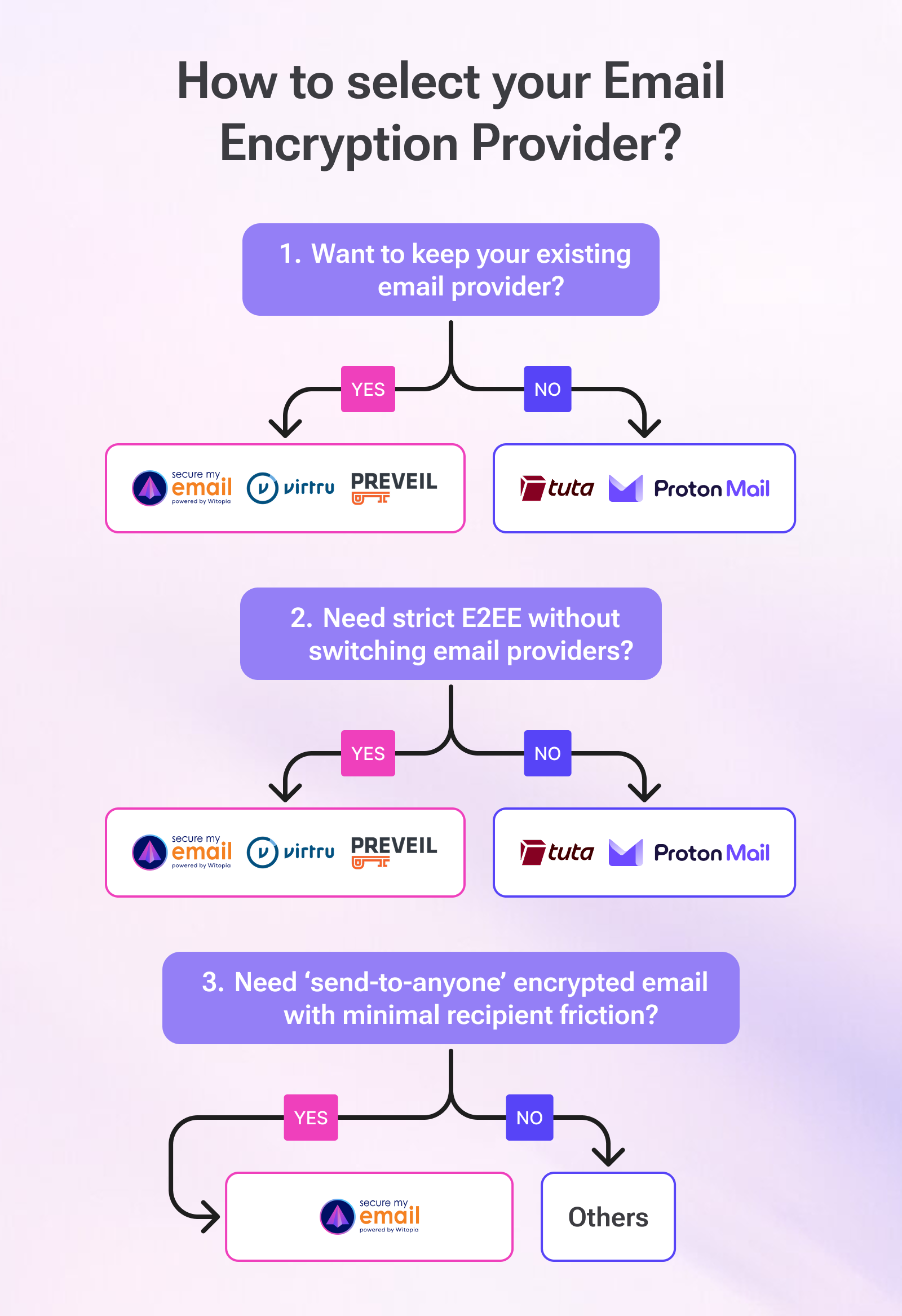
How to choose (without losing your weekend)
Ask yourself three questions:
- Do you want to keep your existing email provider?
- If yes, look at SecureMyEmail, Virtru, PreVeil, and the enterprise suites.
- If no, Proton and Tuta are strong platform options. - Do you need strict end-to-end encryption, or “enterprise encryption controls”?
- Strict E2EE by default: SecureMyEmail (default mode), Virtru, PreVeil.
- Enterprise controls with optional E2EE paths: Microsoft and Google. - How much friction can your recipients tolerate before they hate you?
- If the answer is “none,” prioritize recipient experience.
Final take
If you’re an enterprise with a full compliance stack and you already pay Microsoft or Google a small fortune, you can absolutely make those ecosystems work. If you want policy controls, DLP tooling, and everything-but-the-kitchen-sink compliance features, they have them.
But if you’re a small or midsize business that simply wants to send truly encrypted email, keep your current address, avoid a sales gauntlet, and give recipients a sane experience, SecureMyEmail is the cleanest, fastest, and most affordable option available.
Try it now, no credit card required and be sending encrypted email in minutes.
Frequently Asked Questions
Is Microsoft Purview end-to-end encryption?
Microsoft can support true end-to-end encryption using S/MIME, but most organizations use Purview Message Encryption as a compliance-friendly secure message experience, which is not strict E2EE.
Does Google Workspace offer end-to-end encryption?
Google Workspace offers Client-Side Encryption for Enterprise plans, which can provide strong “Google cannot decrypt” protections, but it requires external key services and admin configuration. It is not the default experience for most users.
What is the easiest encrypted email for small businesses?
If you want encrypted email for small businesses without a sales call, without a credit card, and without migrating your email platform, SecureMyEmail is built for YOU. Many small businesses also choose it because recipients do not need accounts or portals.
Can I use email encryption service for HIPAA?
HIPAA compliance involves process and controls, but encrypted email plus a Business Associate Agreement (BAA) is a common requirement. SecureMyEmail provides a BAA for paid accounts.
Is Outlook or Gmail more secure?
Both are decent platforms, but neither gives you “private by default” email. They protect the connection (TLS) and the account, but sensitive messages still live in your inbox where breaches, account takeovers, forwarding rules, and simple mistakes happen. If you need real protection, add end-to-end encryption — and with SecureMyEmail you can do that on either Gmail or Outlook, without switching providers.
- Encrypt your personal and business emails.
- All VPN Features, Protocols, and Stealth Modes.
- Unconditional 30-Day
Money-Back Guarantee.


