



Google Workspace Client‑Side Encryption (CSE) & Gmail “E2EE” (2026): What It Means, What It Costs, and Easier Alternatives
-

-
 Feb 9, 2026
 -
 8 min read
Share on:


Google’s “end‑to‑end encrypted Gmail” story is real.
It’s also very Google.
If you’re picturing a big button labeled ENCRYPT, you’re about to meet: editions, add‑ons, key services, admin policies, and at least one meeting titled “Key Management Alignment.”
If you’re a small or mid‑sized business that just wants to encrypt sensitive email today (without upgrading your entire Workspace tier and turning your inbox into a project plan), there’s a simpler path.
This article is a plain‑English (as best we could) update on what Google changed (and is still rolling out) around Gmail end‑to‑end encryption via Client‑Side Encryption (CSE). What it actually does, what it costs, what the setup looks like in the real world, and what to do instead if you just want encrypted email without the enterprise complexity and cost.
Pricing + feature availability verified as of January 2026.
(If you spot a plan/pricing change, email us — vendors love updating pricing pages more than they love publishing pricing.)
Quick summary
- Yes, Google Workspace can do Gmail end to end encryption using Client‑Side Encryption (CSE).
- This is not for personal @gmail.com accounts. It applies to managed Google Workspace users (typically on custom domains), not consumer Gmail.
- CSE is not part of the normal Business tiers. It’s listed under select Enterprise/Education/Frontline editions.
- External‑recipient E2EE (without S/MIME) is tied to the Assured Controls add‑on and reached general availability on Oct 2, 2025 — meaning this is no longer just “someday, maybe, after the pilot.”
- Even with the new flow, external recipients will typically see a secure link + verification code (and sometimes a guest account) — so “E2EE” will not be as frictionless as just replying from your Outlook.
- If you need to upgrade Google Workspace tiers to get CSE/E2EE, the cost jump can be… character‑building.
- SecureMyEmail lets you encrypt Google Workspace email in minutes, with a free trial (no payment info), without changing your provider.
What changed, in one sentence
As of October 2, 2025, Google Workspace Gmail Client‑Side Encryption (CSE) users on the right enterprise plan can use gmail end to end encrypted and send emails to anyone (including non‑Gmail recipients) via a guest access flow — without the classic S/MIME certificate circus.
Check out Google Workspace Updates.
Why this matters (a little history)
Gmail is the world’s default email interface for a staggering number of people. Potentially north of 2 Billion.
But, despite some promising projects over the years, Gmail’s efforts of offering “encrypted email” have effectively meant TLS in transit and Google’s encryption at rest. Useful, but not what anyone in network security would really consider to be encrypted email in the sense that “only the sender and recipient can read it.”
If you wanted real end‑to‑end encryption inside the Google ecosystem, the usual answer was S/MIME — which works, but is fatally certificate‑heavy, admin‑heavy, and “hope your recipients like IT projects.” Overall, like manual PGP, it is antiquated when compared to modern alternatives.
Google’s new Client‑Side Encryption (CSE) or “Gmail E2EE” push is a big change. But it may not be the change you needed, depending on your size, your budget, and how much complexity you’re able to endure.
What Google means by “Gmail end‑to‑end encryption”
Google’s Gmail “E2EE” is delivered through Client‑Side Encryption (CSE).
Plain‑English version:
- Encryption happens before Google sees the content. The message body + attachments are encrypted on the sender side (in the browser/client).
- Your org controls key access via an external key service (Google calls this a Key Access Control List Service / KACLS).
CSE overview
External key service (KACLS) - Google stores the encrypted email content (ciphertext) — meaning Google’s servers store a version Google can’t decrypt on their own (assuming the key service is configured correctly).
- Email headers are still headers (subject line, recipients, timestamps). Don’t expect invisibility cloaks.
That’s different from marketing department promises of "encrypted email" that is really just “TLS in transit."
It is not the same thing as “every Gmail user now has Signal‑level E2EE by default.”
Why you suddenly keep hearing “Gmail E2EE or Gmail end to end encryption”
For years, “encrypted Gmail” basically meant:
- TLS in transit (good hygiene),
- Google’s encryption at rest (also good), and
- if you needed true confidentiality, the usual answer was S/MIME (and your week immediately got worse).
What changed in late 2025 is the external recipient story.
The new Gmail promise (with the right plan)
If you have
plus
the Assured Controls add‑on,
Google offers an option that lets Workspace users send CSE‑protected Gmail to external recipients without doing the classic S/MIME certificate exchange.
That’s the headline.
The fine print is that external recipients usually don’t read it “normally” in Outlook/Yahoo/etc. They typically use a secure link + verification step, and sometimes a guest account depending on admin policy.
Who can actually use Google Workspace CSE for Gmail?
This is the moment many SMBs realize they’re not the target audience.
Google lists Gmail CSE availability under specific editions (not the standard Business plans), including:
- Enterprise Plus
- Education Plus
- Education Standard
- Frontline Plus
And the “send E2EE to anyone without S/MIME” capability is tied to Assured Controls.Translation: this is aimed at regulated, compliance‑heavy orgs who treat “email encryption” as a program, not a feature.
External recipients: what the experience actually looks like
Yes, Gmail CSE can work with external recipients — with caveats that matter.
Typical external flow:
- Recipient clicks View message
- Recipient verifies via a code (and/or signs in)
- Depending on admin policy, recipient may need a guest account
So the external flow exists, but it’s not “they just read it like nothing happened.”
This is normal for enterprise secure email. It’s also why user education matters, because attackers love to cosplay as “secure message portals.”
Here's Google’s admin help on the external/guest experience.
What does Google Workspace CSE cost?
People usually land here asking: What does Google Workspace CSE cost? Here’s the straight answer.
Google publishes pricing for the Business tiers, but the CSE/Gmail E2EE story typically pushes you into enterprise territory which is quote-only, but we do our best.
Published Google Workspace pricing (for context)
- Business Standard: $14/user/month (annual) or $13.44 billed monthly
- Business Plus: $22/user/month (annual) or $21.12 billed monthly
- Enterprise: Contact sales (quote‑based)
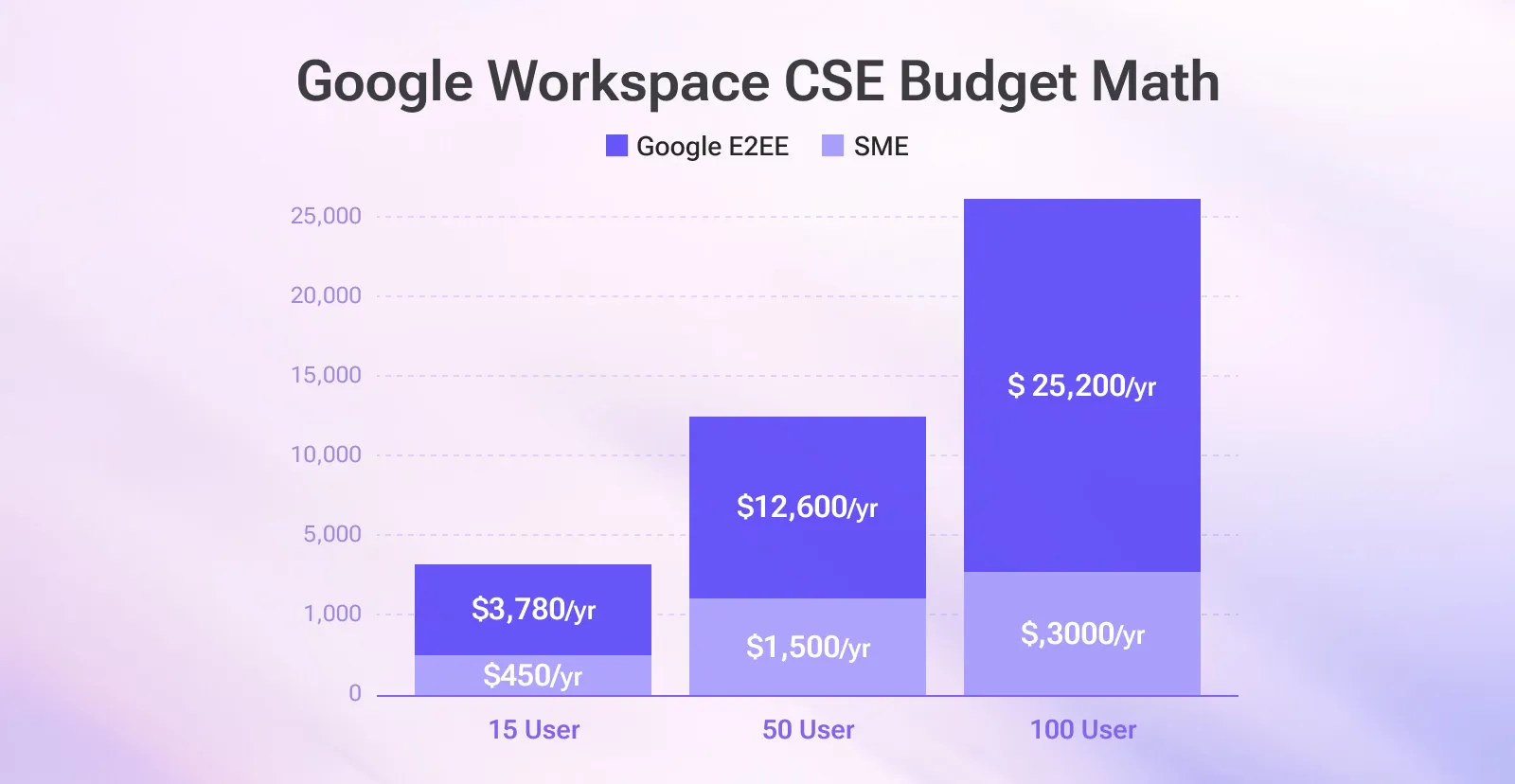
The “budget math” people care about (15, 50, 100 users)
If you’re on Business Standard ($14) and you’re considering enterprise primarily to get CSE/E2EE, the delta matters.
Enterprise Plus pricing is quote‑based, so here’s a planning example using $35/user/month (a $21 increase) as a ballpark number (not a promise, not a quote, just a sanity check) to add end-to-end encryption to your Google Workspace email with CSE.
- 15 users: +$315/month (+$3,780/year)
- 50 users: +$1,050/month (+$12,600/year)
- 100 users: +$2,100/month (+$25,200/year)
Now compare SecureMyEmail at $2.50/user/month (annual):
- 15 users: $37.50/month ($450/year)
- 50 users: $125/month ($1,500/year)
- 100 users: $250/month ($3,000/year)
Yes, higher Workspace tiers include other features (storage, controls, auditability, etc.).But if your main goal is simply email encryption, upgrading your entire Workspace tier can feel like buying a 3-year subscription to an entire streaming bundle because you wanted to watch one show. You’ll get more stuff, sure, but you’re mostly paying for things that aren’t the problem you were trying to solve.
What do I have to do to use Google’s new Gmail E2EE?
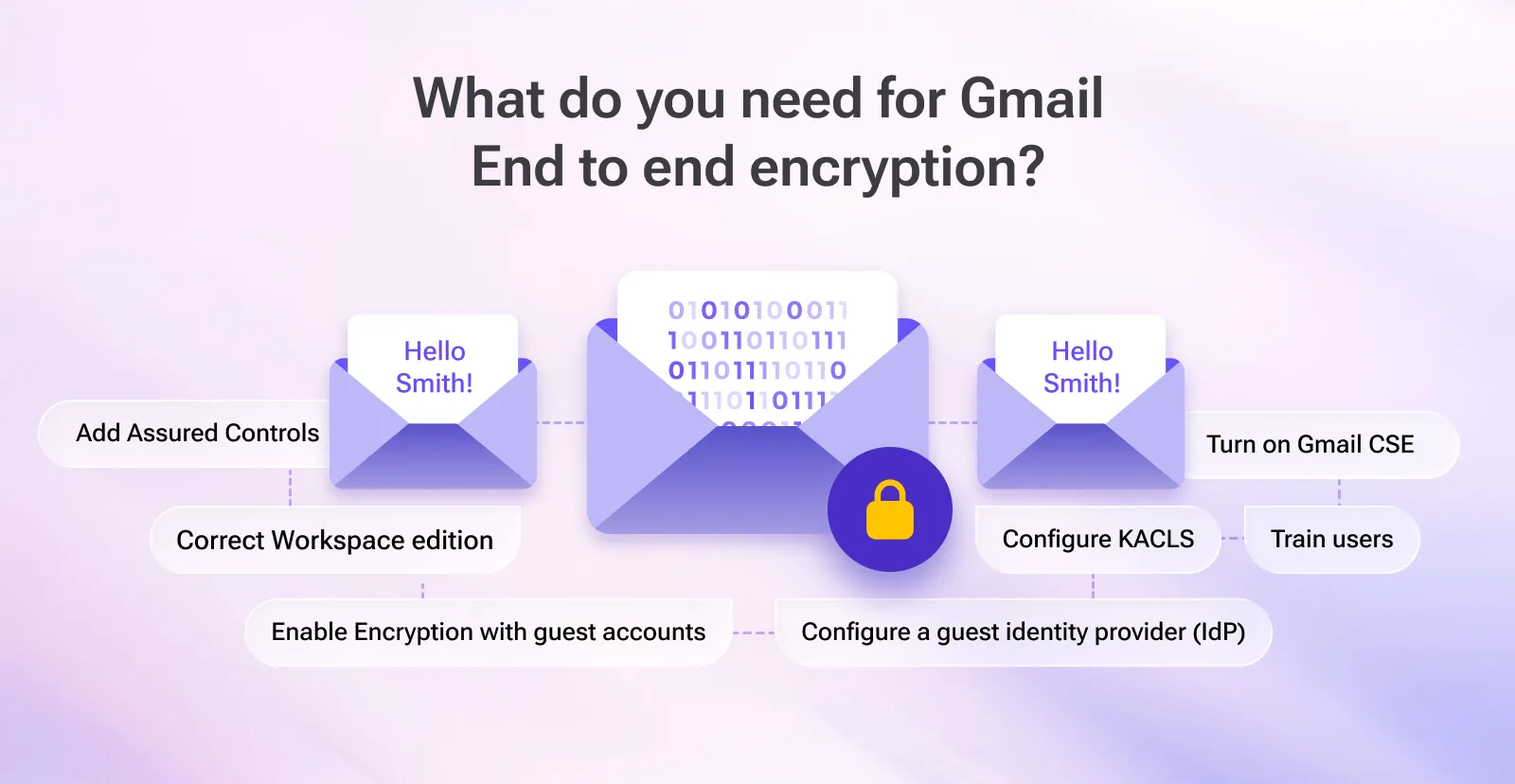
If you want the “send E2EE emails to anyone” flow, here’s the real‑world checklist:
- Be on the right Workspace edition (typically Enterprise Plus).
- Add Assured Controls.
- Turn on Gmail Client‑Side Encryption (CSE) in the Admin console.
- Enable Encryption with guest accounts (this is the setting that avoids the S/MIME certificate exchange for external recipients).
Admin help: https://support.google.com/a/answer/14311764?hl=en - Configure an external key service (KACLS).
Admin help: https://support.google.com/a/answer/14515906?hl=en - Configure a guest identity provider (IdP) so external recipients can access the message via the guest flow.
Admin help: https://support.google.com/a/answer/14757842?hl=en - Pilot + train users (because the first external recipient who sees “secure guest message” may assume it’s phishing).
If you read that list and your eye started twitching: you are not alone.
Why Google’s approach is expensive (and why that doesn’t make SecureMyEmail “weaker”)
Google is your email provider. Their pricing covers:
- the mail platform itself,
- storage,
- admin + compliance controls,
- and the operational reality of running Gmail at global scale.
SecureMyEmail is an encryption service that works with your existing email — think “secure overlay + dedicated encrypted client experience,” not “replace Google.”
So yes: Google can be more expensive because you’re buying more than encryption.
But if you already have Workspace and you mainly need real encrypted email, an overlay approach can be dramatically cheaper. In fact, SecureMyEmail is the best way to encrypt any email in 2026.
The setup reality check (why CSE becomes a project)
CSE is designed for orgs that want governance controls (policy + audit + key ownership) — which is great.It also means you’re typically dealing with:
- a key service decision (partner vs. build)
- admin rollout planning and group policies
- user training and recipient expectations
- edge‑case troubleshooting
If your “IT team” is whoever knows the router password, you will feel this. Bigtime.
The easier alternative: encrypt Google Workspace email with SecureMyEmail
SecureMyEmail exists because a lot of businesses want the security outcome without the enterprise complexity.
With SecureMyEmail, you can:
- keep using your Google Workspace / Gmail (personal or any plan)
- start a free trial immediately (no payment info required)
- send encrypted email in minutes
- encrypt attachments and replies, too
“Is this allowed?”
Yes. Google supports third‑party email clients.
SecureMyEmail connects to Google Workspace like other mail clients do. You authorize access (Google sign‑in), it syncs your mailbox, and you send mail.
In fact, SecureMyEmail has been an authorized Google‑integrated service for years. Google doesn’t hand out OAuth access to just anyone.
Recipient experience (where most “secure email” products lose friends)
For external recipients, “secure email” often becomes:
- a portal
- an account
- a password exchange
- or a “please contact your admin” moment
SecureMyEmail supports two practical options:
- One‑time passcode: recipient opens a secure link and enters a one‑time passcode delivered via a second email (typically only once per thread).
- Shared password (zero‑knowledge): you set a password and share it out‑of‑band (text/phone) or use the included "hint" field to ask the recipient something they already know.
Either way: no accounts, no installs, minimal drama.
“But is SecureMyEmail actually end‑to‑end encrypted?”
Yes — including a true zero‑knowledge option.
In password‑based (zero‑knowledge) mode, SecureMyEmail uses modern cryptography (including ChaCha20‑Poly1305) and is designed so even SecureMyEmail can’t access your message.
The difference is that we hide the complexity so you don’t need to become a part‑time cryptographer to send one sensitive email.
See how SecureMyEmail compares to other email encryption solutions in 2026.
Who CSE is for vs. who SecureMyEmail is for
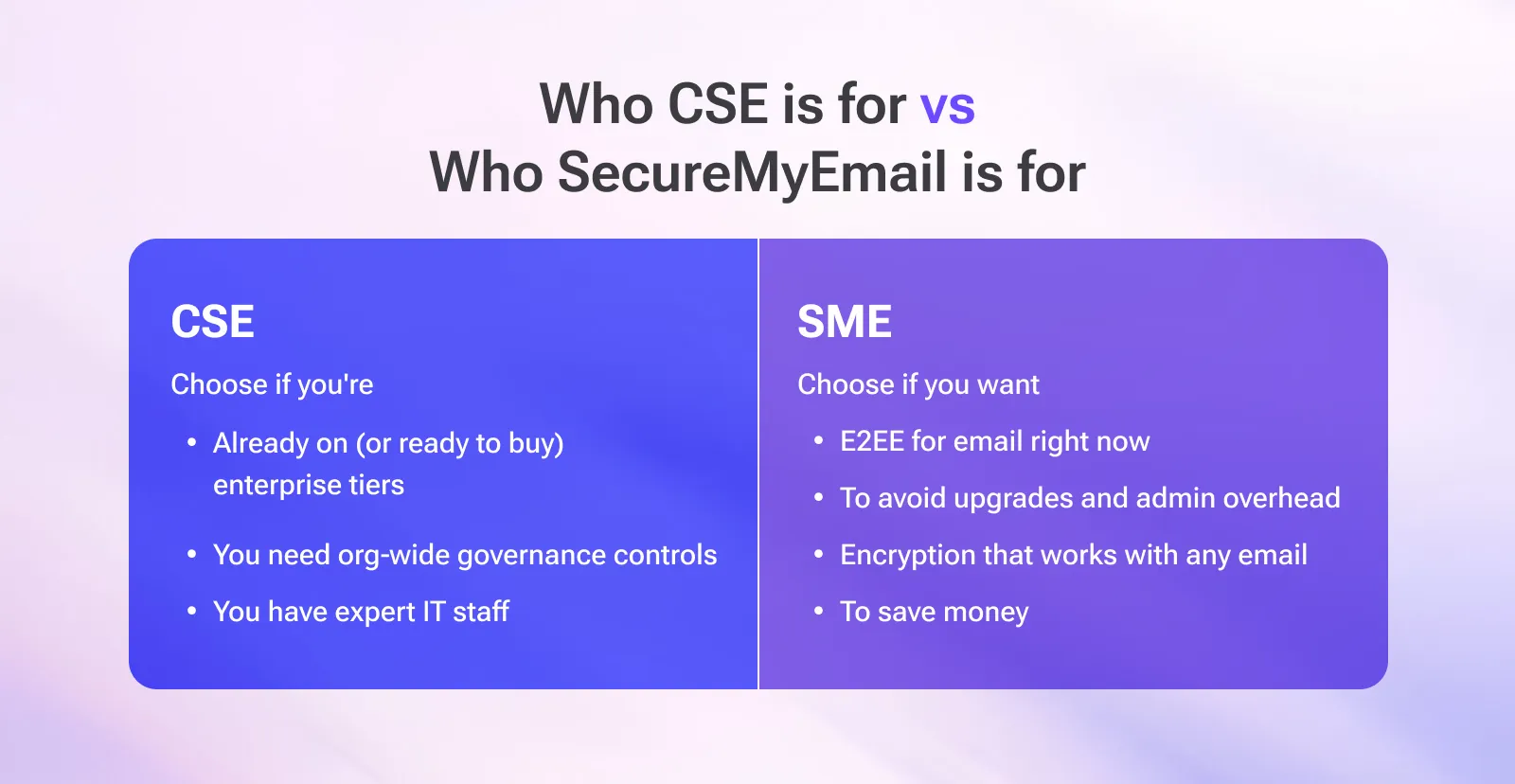
Choose Google Workspace CSE / Gmail E2EE if:
- you’re already on (or ready to buy) enterprise tiers
- you need org‑wide governance controls and key ownership outside Google
- you have staff who can do own setup, support, and policy
Choose SecureMyEmail if:
- you want encrypted email right now
- you want to avoid plan upgrades and admin overhead
- you want encryption that works with any email address/provider
- you care about price (because you like money)
TL;DR
Google adding Gmail “E2EE” via CSE is a meaningful improvement — for organizations that need governance, policy controls, and key ownership.
But if your goal is simply “encrypt business email without making this a project,” you can keep your current Workspace plan and add encryption with SecureMyEmail in minutes.
Try SecureMyEmail free (no payment info required)
For team billing/invoicing and setup help, email sales@securemyemail.com.
Frequently Asked Questions
Does Google Workspace have end‑to‑end encryption?
Google Workspace supports Gmail “E2EE” via Client‑Side Encryption (CSE), which is an enterprise feature and not included in standard Business tiers.
Is Google Workspace encryption the same as TLS?
No. TLS protects email in transit. CSE is much stronger and changes who can decrypt the message content.
Can I do this on a personal @gmail.com account?
Generally, Workspace enterprise controls apply to managed Workspace users, not consumer @gmail.com accounts. SecureMyEmail does support @gmail.com though and actually has a free tier for a single @gmail.com address. Find out more in this article.