



Best Encrypted Email for Small Business (2026): Simple Options, Real Pricing, and What Actually Works
-

-
 Mar 5, 2026
 -
 7 min read
Share on:


If you’re a small business looking for “the best encrypted email,” you’re probably not trying to start a compliance program.
You want to:
- send sensitive emails and attachments,
- keep using the email you already have,
- avoid making clients create accounts,
- and not pay enterprise-suite pricing for something that should be routine, not an IT project.
This guide breaks down the most common options small businesses should actually consider, what they cost (in real life, including time), and the fastest path to getting the best encrypted email for small business in 2026.
Quick summary
- First decision: switch your email to an encrypted email provider, or use an email-encryption provider that works with the email you already have.
- Most small businesses should choose an email-encryption provider that works with their current email addresses and doesn’t require recipient setup.
- PGP and S/MIME are real end-to-end encryption standards, but they usually turn into key and certificate management projects.
- Microsoft and Google can encrypt email, but the path is usually tied to their ecosystem (licensing tiers, add-ons, admin setup), and can get complicated and expensive fast.
- If you want strong security and a sane workflow for external recipients, SecureMyEmail is the provider-agnostic option built for small business.
Switch providers vs keep your current inbox (the decision that really matters)
Small business buyers, looking into encrypted email alternatives, tend to fall into two camps:
Option A: Switch to an “encrypted email provider”
This is the Proton Mail / Tuta approach. It can be a great fit if you are willing to move inboxes, migrate users, retrain everyone, and live inside a new ecosystem.
Option B: Keep your email provider, add encryption on top
This is the “don’t make me migrate inboxes please” approach.
There are two versions of Option B:
- Provider-agnostic encryption (SecureMyEmail): works with any email address/provider, so you can encrypt what you use today and still be free to switch providers later.
- Provider-tied encryption (Microsoft/Google): encryption features that work best inside their ecosystem and often involve licensing tiers, add-ons, admin setup, and significantly increased expenses.
If your business already runs on Microsoft 365 or Google Workspace and you just want encrypted email quickly (especially for external recipients), starting with a provider-agnostic encryption service may still be the simplest and least expensive path. You should compare.
The 6 most common encrypted email options for small business
These are the paths most SMBs actually consider.
You’ll notice they map back to that first decision:
- Switch providers (encrypted email provider), or
- Keep your inbox and add encryption (provider-agnostic or provider-tied).
The rest are common variations on those themes: Microsoft/Google suite features, portal workflows, and classic standards (PGP/S/MIME).
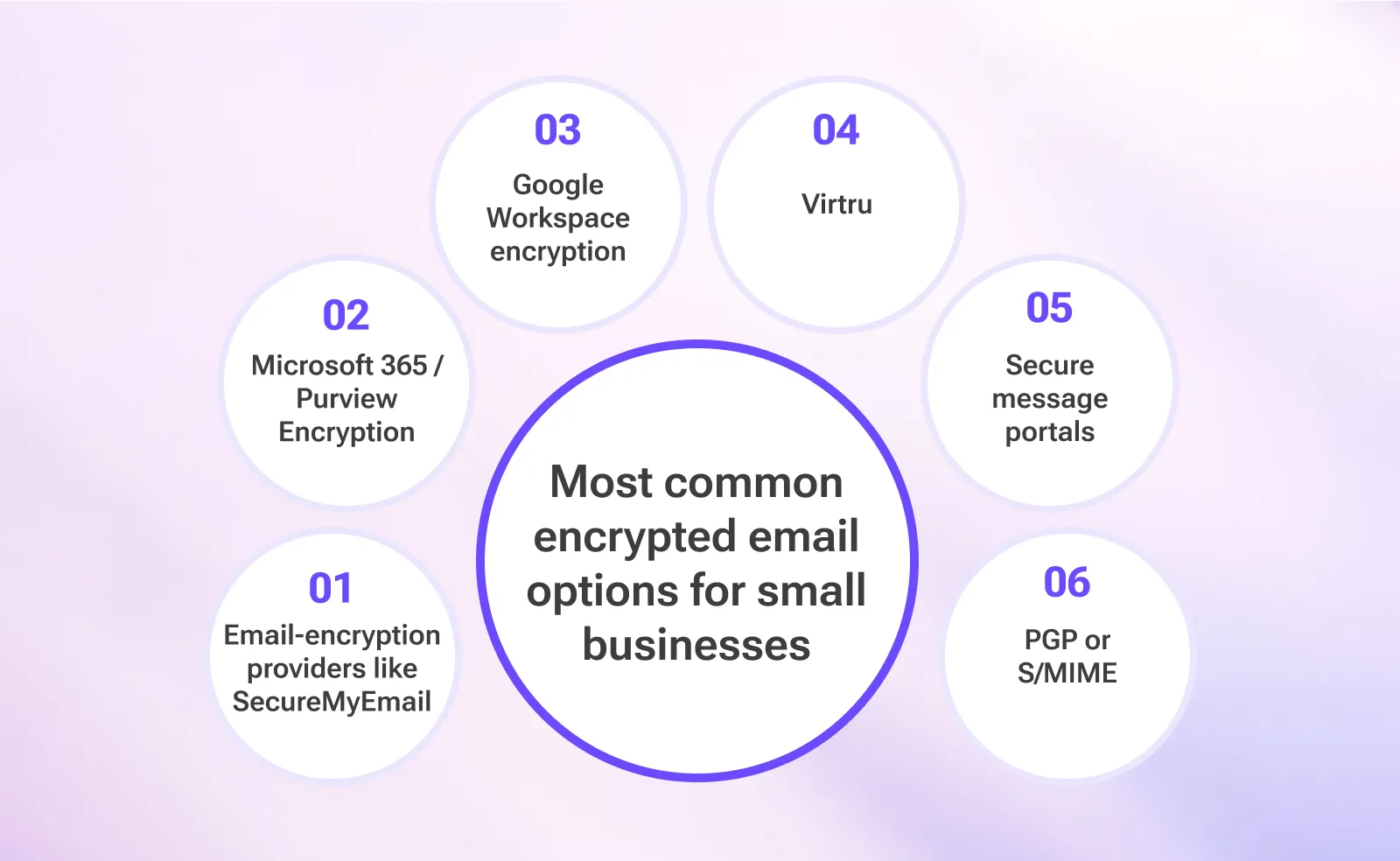
1) Email-encryption providers (best for most SMBs)
What it is: An encryption service that works with your existing email address and provider. You don’t migrate inboxes, and recipients don’t need to install anything.
Best for: businesses that email clients, vendors, and the outside world.
Typical recipient experience: secure link + passcode, then read and reply.
Why it wins: it’s the only approach that consistently works with normal external recipients, without turning email encryption into a rollout project. It’s also typically the lowest-cost approach for SMBs especially once you count time spent on setup, admin, and recipient support.
Bonus: because it’s not tied to a provider, you can change email providers later without changing your encryption system.
2) Microsoft 365 / Purview Message Encryption (good, but can get “suite-y”)
If you already pay Microsoft, it’s natural to ask whether you can just use the built-in encryption path.
Best for: organizations already standardized on Microsoft 365 that want policy-driven controls.
Tradeoffs: upgrades, compliance add-ons, configuration complexity, and a user experience that often feels like “secure portal email.” Costs can rise quickly once you add the licensing tiers and add-ons that make it workable at scale.
Interesting read: See how you can end-to-end encrypt your outlook email even without Microsoft 365 / Purview.
3) Google Workspace encryption (hosted S/MIME and CSE)
Google has multiple “secure email” paths, but the naming is a bit of a scavenger hunt: CSE, hosted S/MIME, ‘easy E2EE,’ pick your quest.
Best for: Google Workspace orgs with IT resources and a reason to use Google’s controls.
Tradeoffs: tier requirements, admin-driven setup, and complexity that can be overkill for SMBs. Costs can also jump depending on the licensing tier and any add-ons required for the security model you’re aiming for.
(If you want the detailed breakdown, see: Google Workspace CSE cost and Gmail E2EE.)
4) Virtru (the add-in / enterprise-style path)
Virtru is common in business environments because it can integrate into Outlook and Gmail workflows.
Best for: organizations that want a familiar “encrypt button” style experience and are comfortable with deployment, admin overhead, and higher pricing.
Tradeoffs: this is where many small businesses discover the difference between “encrypt email” and “roll out email encryption.” Pricing can be higher than SMBs expect, especially once you factor in per-user costs, add-ons, and the time spent managing deployments and support.
5) “Secure message portals” (the classic corporate workflow)
This is the category where recipients get a link and end up in a portal that may require account creation, passwords, and occasional existential dread.
Classic examples: Barracuda’s Message Center and Zix’s Secure Message Center style workflows, where recipients often have to create a password/account and return to a portal to read and reply.
Best for: organizations that need strict controls and can tolerate recipient friction.
Tradeoffs: higher friction and more IT overhead (portal setup, branding/policies, training), plus a steady stream of password resets and “can you resend that secure message?” follow-ups. Pricing can also get expensive fast, often via add-ons, bundles, or quote-based tiers that are hard for SMBs to predict.
Nuance: links are fine; the risky habit is training people to click unfamiliar portal links and then enter credentials.
6) PGP or S/MIME (the standards-based path)
PGP and S/MIME can provide true end-to-end encryption, but they come with a cost: keys, certificates, onboarding, and device management.
Best for: predictable recipient ecosystems, technical counterparts, or organizations that actually want to run key and certificate lifecycle management.
Tradeoffs: this is where “simple encryption” becomes a tiny crypto program you maintain forever — and while the tools can be cheap, the real cost is time: onboarding, key/cert lifecycle, device churn, and support.
Find out whether PGP email encryption or S/MIME is the right fit for your business before making the final decision.
Comparison table (small-business reality)
Quick note: every option below still lets you send normal internal email. This table is comparing how each approach handles encrypted email to real-world recipients (especially external clients, vendors, and partners), plus the practical burden on a small business.
Option | Best for | Recipient friction | Setup burden | Ongoing burden | Typical SMB cost vibe |
|---|---|---|---|---|---|
Provider-agnostic encryption (SecureMyEmail) | Most SMBs emailing external recipients | Low | Low | Low | $ |
Microsoft 365 / Purview | Microsoft orgs that want governance | Medium | Medium–High | Medium–High | $$–$$$ |
Google Workspace (CSE/hosted S/MIME) | Google orgs with IT resources | Medium | Medium–High | Medium | $$–$$$ |
Virtru | Add-in workflows, larger SMB/mid-market | Medium | Medium | Medium | $$–$$$ |
Secure portals (category) | Strict controls, compliance-driven orgs | High | Medium | Medium | $$–$$$ |
PGP / S/MIME | Technical or closed recipient ecosystems | High | High | High | $–$$ (tools) + $$$ (time) |
Provider-agnostic encryption is not only among the best encrypted email for small businesses in 2026 but also an excellent encrypted email alternative for other business sizes. See a comprehensive comparison of best encrypted email for business (2026).
Best overall for small business: SecureMyEmail

If you want encrypted email that actually works with real people, the provider-agnostic email-encryption model usually wins.
SecureMyEmail is designed for exactly this:
- Works with any email address and provider (Gmail, Microsoft 365, Outlook.com, Yahoo, Zoho, custom domains, and more)
- You can encrypt what you use today and still be free to switch providers later
- Encrypts messages, attachments, and replies
- Recipients do not need an account or install
- Strong recipient experience: secure link + passcode
- Offers two strong modes: a fast everyday encrypted workflow, plus Encrypted+ for true end-to-end, zero-knowledge encryption when you want maximum privacy (with zero-knowledge encryption at rest in both modes)
Start immediately with a free trial, with no payment info and no sales call.
Here's a detailed take on why SecureMyEmail is the best encrypted email for small businesses in 2026.
How to decide (without losing your weekend)
- Do you want to switch email providers, or keep your current inbox?
- If switching providers is fine, an encrypted email provider (Proton/Tuta style) can work.
- If you want to keep your current address/provider (or stay free to switch later), start with a provider-agnostic email-encryption service. - Are your recipients mostly external (clients, vendors, customers)?
If yes, prioritize recipient usability (no installs, no accounts). This is where provider-agnostic encryption services tend to win. - Do you require in-client decryption (no links, decrypt inside Outlook/Apple Mail)?
If yes, you’re in S/MIME or PGP territory, and you should budget for certificate or key lifecycle management. - Do you truly need governance, or do you mainly need confidentiality that people will actually use?
Microsoft/Google compliance stacks can be the right pain when you need policy, auditing, and retention. Just don’t confuse “more checkboxes” with “more secure.”
Frequently Asked Questions
Is Gmail or Outlook “already encrypted”?
Most providers use TLS (encryption in transit), which is good, but it is not the same thing as end-to-end encrypted email for sensitive content.
Do recipients need an account to read encrypted email?
With many portal-style systems, yes. With provider-agnostic services like SecureMyEmail, recipients typically do not need an account.
Is PGP or S/MIME better than a provider-agnostic encryption service?
Not necessarily. PGP and S/MIME are excellent standards-based approaches, but they require key/certificate lifecycle management and recipient participation.
A provider-agnostic encryption service can be just as secure (including true end-to-end, zero-knowledge modes like SecureMyEmail’s Encrypted+). The real difference is operational: for most small businesses emailing external recipients, the provider-agnostic approach is simply far more usable, and easier to keep working over time.
Do I need a plugin or add-in to use this?
No. Provider-agnostic encryption is designed to work across devices without requiring Outlook/browser add-ins, which keeps rollout and support simple.
If your team prefers a one-click compose experience inside Outlook or the browser, add-ins can be nice to have. SecureMyEmail works without them today, and plugins are planned, so you’re not choosing “either/or” forever.
(If you want to compare the add-in-first approach right now, options like Virtru are the usual benchmark.)
What features should I look for in encrypted email for business?
If you are a small business, the main features you should look for in encrypted email are zero-knowledge end-to-end encryption, ease of use (for you and your recipients), compliance support (if needed), and realistic pricing.